Highlighter: Make creating, viewing, and managing highlights easier
Highlighter is a free Chrome add-on developed by LeNoob that aims to simplify the process of creating, viewing, and managing highlights. Whether you're a student, researcher, or simply someone who likes to collect interesting ideas from the internet, Highlighter provides a convenient solution.
Top Recommended Alternative

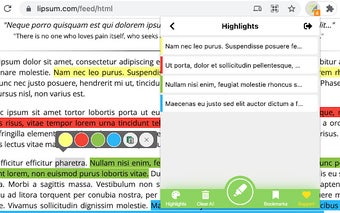
With Highlighter, you can easily highlight selected text on webpages and customize the highlight color to suit your preferences. This feature allows you to mark important information and easily revisit it later. Additionally, you have the ability to remove highlights when they are no longer needed.
One of the standout features of Highlighter is the ability to bookmark highlighted sites. This allows you to quickly access the webpages that contain your highlighted content, saving you time and effort in searching for specific information.
Another useful feature is the bulk remove highlights option from the popup. This feature enables you to efficiently manage and organize your highlights by removing multiple highlights at once.
Highlighter also provides the option to enable or disable highlighting directly from the popup. This allows you to easily control when and where you want to use the highlighter tool, providing flexibility and convenience.
To get started with Highlighter, simply install the extension from the Chrome Web Store. After installation, it is recommended to refresh all tabs or reopen the browser for the extension to fully function.
Overall, Highlighter is a valuable tool for anyone who wants to streamline the process of creating, viewing, and managing highlights on the web. Its intuitive interface and useful features make it a must-have add-on for those who frequently work with highlighted content.